Public transport network in a time window
The container /pt_windows_export (cfg/main/pt_windows_export.dms, since 21 October 2026, #57) selects every public transport trip that runs in a time window on a chosen day. It makes these trips available as line layers with their attributes: in the GeoDMS GUI for thematic maps, and as GeoPackage, parquet or csv files for GIS. Trips that overlap are deduplicated in two ways, per line and shape and per stop-to-stop segment, and the attributes of their trips are aggregated.
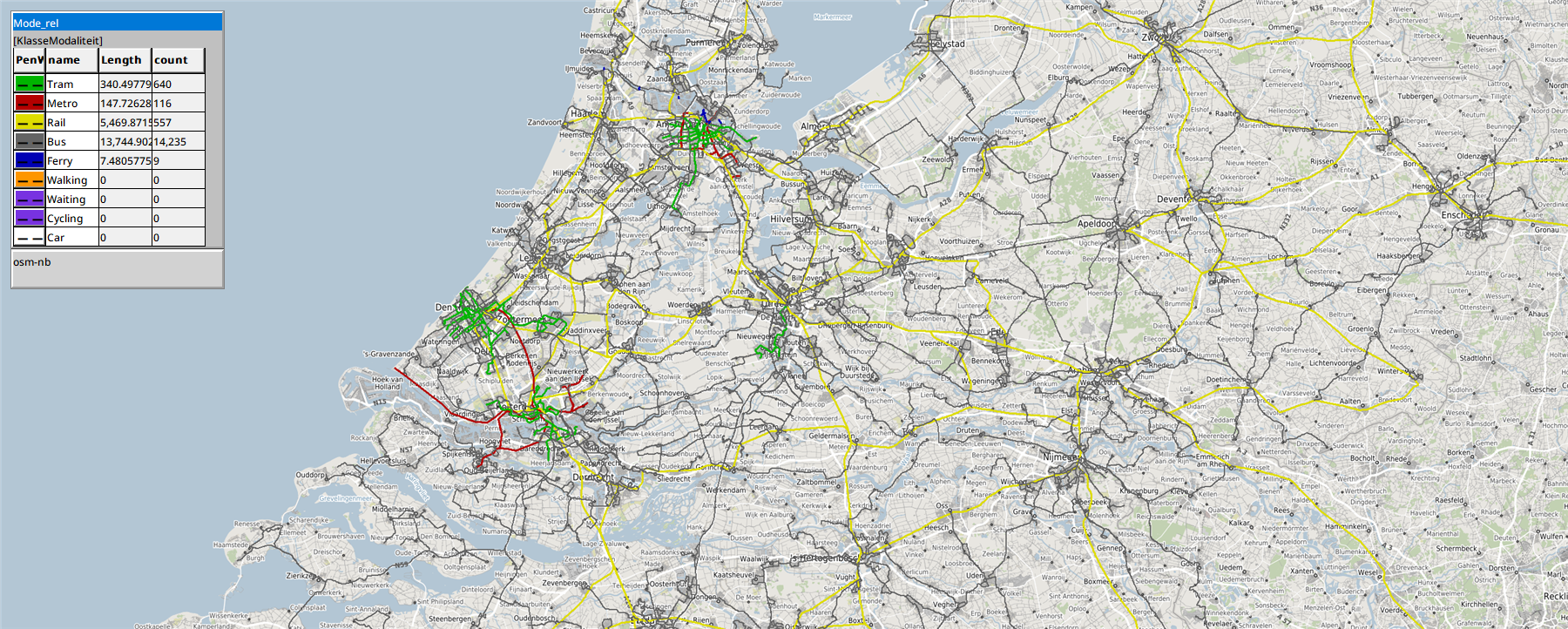
Kaart/Segmenten/Mode_rel in a map view of the GeoDMS GUI: the segments of Tuesday 13 October 2026, 23:00 to 24:00, coloured by mode: tram green, metro red, rail yellow, bus grey, ferry blue. The legend of the layer gives the length in km and the number of segments per mode.
Contents
- Settings
- The day
- The layers
- Segment lines along the shape
- Viewing the layers in the GUI
- Export
- Example: 13 October 2026, 23:00 to 24:00
- Verification
Settings
The settings are at the top of the container:
| parameter | default | meaning |
|---|---|---|
Dag | ModelParameters/Advanced/Analysis_date | The day (yyyymmdd) whose trips are selected. It can be any day that the loaded feed covers; see The day. |
Begin, Eind | '07:00', '09:00' | The window, as HH:MM on the time axis of Dag: seconds since 00:00, so '25:00' is 01:00 the night after, up to 47:59. A trip is selected when it runs at some moment in the window, not only when it departs in it. |
HalteClusterAfstand | Advanced/DistanceStopClusters (100 m) | Stops within this distance of each other, and so on (single linkage), form one node: the platforms of a station, the stops on both sides of a street. At 0 m only stops at the same place are merged. |
MaxAfstandHalteShape | 100 m | A stop further than this from the shape of its trip is not projected on the shape; its segment becomes a straight line. |
SegmentenOngericht | true | Both directions between two nodes form one segment, with nr_heen and nr_terug, or one segment per direction. |
ExportFormaat | 'gpkg' | 'gpkg', 'parquet' (zstd) or 'csv' (the geometry as WKT). |
The feed is the one of the reference date of the model: ModelParameters/AnalysisMoment sets Advanced/GTFS_file_date and the GTFS store (see Create routable network from GTFS files). For another year, set AnalysisMoment; the store is not chosen per container. The report names the first and last date of the feed; the feed of 25 September 2026 covers 24 September to 12 December 2026.
The day
The container selects the trips of Dag itself, so the selection does not depend on Analysis_date or on LoadFeeds/ServiceDays. It does follow the same rules (see Step 2 of the GTFS page):
Impl/Dagenholds D−1, D and D+1 aroundDag. Their dates come fromTemplates/DayNr_TandTemplates/CivilDate_T.- A service runs on a date when the sum of
exception_typeincalendar_datesfor that date is 1, as inLoadFeeds/Services/Today_exc. - On the time axis of D: from D−1 the stop times of 24:00 and later, minus 24 hours; from D all trips; from D+1 the whole trips that start before the end of the window, plus 24 hours. Each day uses
LoadFeeds/DayLinks_T, the same template the network uses. - All trips are included, also the flex options that the model thins out (
LoadFeeds/FlexOptions);in_ovnettells whether a trip is part of the network of the model.
Two checks stop the run with a failed integrity check, as in the network:
Impl/Check_DagenCompleet: every day the window needs has at leastAdvanced/MinServiceDayTripShareof the trips of the busiest day with the same weekday. D is always needed, D−1 when the window starts beforeAdvanced/PrevServiceDayTailEnd(06:00), D+1 when it ends after midnight.Impl/Check_GeenZomertijdwissel: D, and D+1 when needed, is not the last Sunday of March or October.
The layers
The four tables are in Kaart, without storage, so looking at them in the GUI writes nothing. Their relations refer to classifications in Klassen with a colour and a line width (PenColor, PenWidth), so a map view colours them directly.
Ritten
One row per trip instance, that is a trip on one day of Dagen, that overlaps the window. A trip with only one stop has no link and is left out; in the feed of 25 September 2026 that is 4 trips of line Z132 to Zierikzee between 07:00 and 09:00.
- Relations:
Route_rel,Agency_rel,Mode_rel(Klassen/KlasseModaliteit),FlexKlasse_rel(Klassen/KlasseFlex),Lijnvoering_rel. - Columns:
trip_id,dienstdag(D−1, D or D+1),datum,vertrek,aankomst,duur_min,lijn,lijnnaam,aanbieder,modaliteit,is_flex,in_ovnet,heeft_shape,nr_haltes,eerste_halte,laatste_halte,headsign,richting,lengte_km,lijnvoering. - Geometry: the shape of the trip (
shapes.txt). A trip without a shape gets a line along its stops: 2.4% of the trips in the feed of 25 September 2026, 13.5% in that of 3 October 2023.
Lijnvoeringen
The trips deduplicated per line (route) and shape; a trip without a shape is grouped per line and stop pattern (first stop, last stop, number of stops). Each row has one operator, one mode and one flex value, those of its first trip.
- Columns:
lijn,lijnnaam,aanbieder,modaliteit,is_flex,nr_ritten,ritten_per_uur,nr_in_ovnet,eerste_vertrek,laatste_vertrek,gem_duur_min,nr_haltes,eerste_halte,laatste_halte,bron_geometrie(shapeorhaltes),lengte_km.
Knopen
The stops clustered within HalteClusterAfstand (join_near_values and connected_parts, as for the OV-knooppunten), over all stops of the feed, so that node numbers do not depend on the day or the window. The layer keeps the nodes with departures or arrivals in the window. The busiest stop of a node gives its name and point.
- Columns:
knoop,knoopnaam,nr_haltes,nr_vertrekken,vertrekken_per_uur,modaliteiten,nr_lijnen.
Segmenten
The stop-to-stop links in the window between two different nodes, deduplicated per pair of nodes and mode. With SegmentenOngericht both directions form one segment; nr_heen counts the passages from the node with the lowest number. Links within one node, between platforms of a station for example, form no segment; the report counts them.
- Relations:
VanKnoop_rel,NaarKnoop_rel,Mode_rel,Agency_rel(the operator with the most passages),FlexKlasse_rel(fixed, partly flex, flex). - Columns:
van_knoop,naar_knoop,van_naam,naar_naam,modaliteit,nr_passages,per_uur,nr_heen,nr_terug,nr_lijnen,lijnen,aanbieders,aanbieder,nr_flex,aandeel_flex,flexklasse,nr_in_ovnet,min_reistijd_min,gem_reistijd_min,eerste_vertrek,laatste_vertrek,lengte_km,bron_geometrie(shapeorrecht).
Segment lines along the shape
The line of a segment follows the shape of a representative link: the first link in the window whose trip has a shape. Its stops A and B are projected on that shape with connect_info_eq, the projection of connect, restricted to the shape of the trip itself. For each stop it gives the segment of the shape (SegmID) and the projected point (CutPoint). The line runs:
- from A to its projection;
- along the vertices of the shape from
SegmIDof A + 1 up toSegmIDof B; - from the projection of B to B.
The first and last pieces are the connection lines from stop to shape that connect adds as well. The vertices come from sequence2points on the shapes in use, and the points of all segments are laid out one after the other with classify on cumulative offsets (Impl/SegGeom).
A segment becomes the straight line from A to B when:
- no link of the segment has a shape;
- a stop is further than
MaxAfstandHalteShapefrom the shape; - B does not come after A on the shape, which happens on a loop where the last stop coincides with the first.
connect_info_eq takes the maximum distance squared: in a probe with a maximum of 5, stops at 1 and 2 m from the arc were projected, stops at 3 and 4 m were not. Impl/SegGeom/MaxAfstand2 passes the square.
In the feed of 25 September 2026, 187 stops have the coordinates (0, 0), 45 of them with stop times (platforms of Berlin Hbf and Münster-Häger among others). Without a correction the segments to Münster-Häger ran to the Gulf of Guinea, 6,209 km from Altenberge. Since 21 October 2026 such a stop gets the point of its parent_station in LoadFeeds/protoStops for the whole model; all 45 have one (see Step 3 of the GTFS page). The report counts these stops.
Viewing the layers in the GUI
Open cfg/main.dms in the GeoDMS GUI and set Dag, Begin and Eind at the top of pt_windows_export. Then:
- Select
/pt_windows_export/Kaart/Segmenten/Mode_relin the tree, or type that path in the address bar. - Open a map view (View > Map View, Ctrl+M). The segments are drawn on the background map, coloured and sized per mode with the legend of the layer.
- Any other attribute of the same table can be shown the same way:
FlexKlasse_relfor fixed and flex services,per_uurornr_lijnenfor a classification of the numbers.Kaart/Knopenshows the nodes as points.
The first map view computes the selection; for a window of two hours that takes less than a minute. The view starts zoomed out, because the night trains run far into Germany (the Nightjet via Würzburg).
Export
/pt_windows_export/Generate writes the four layers and the report in one request; MakeUnlinkedData/GTFS/Export_OV_Net_Venster requests it from the top of the configuration. From a command line:
GeoDmsRun.exe /L<log file> cfg\main.dms /pt_windows_export/Generate
The files are %LocalDataProjDir%/Output/ptwindow_<feed>_<day>_<window>_<layer>.<format>, for example ptwindow_20260925_20261013_23h00m-24h00m_segmenten.gpkg, with _report.txt next to them. The export writes the relations as text (aanbieder, modaliteit, flexklasse) and the numbers as numbers. GDAL_LayerCreationOptions is GEOMETRY=AS_WKT for csv and COMPRESSION=ZSTD for parquet.
The report lists the days and their checks, the number of rows per layer, the trips without a shape, the segments along the shape and straight, and the links within a node. It ends with two checks: the trips are the sum of nr_ritten of the line variants, and the links in the window are the sum of nr_passages of the segments plus the links within a node.
Example: 13 October 2026, 23:00 to 24:00
With the feed of 25 September 2026 the window 23:00 to 24:00 on Tuesday 13 October 2026 gives:
| layer | rows | notes |
|---|---|---|
| Ritten | 4,997 | 66 without a shape; 802 flex, of which 752 thinned flex options outside the model network |
| Lijnvoeringen | 2,073 | 2,022 per shape, 51 per stop pattern |
| Knopen | 13,244 | |
| Segmenten | 15,557 | 14,841 along the shape, 147 straight with a shape, 569 straight without a shape |
There are 62,015 links in the window, 339 of them within a node, and both checks pass. Per mode:
| mode | segments | length (km) | passages |
|---|---|---|---|
| tram | 640 | 340 | 6,333 |
| metro | 116 | 148 | 1,464 |
| rail | 557 | 5,470 | 2,143 |
| bus | 14,235 | 13,745 | 51,670 |
| ferry | 9 | 7.5 | 66 |
The rail length includes the international trains in Germany and Belgium; the longest segment is Würzburg to Kassel of the Nightjet (204 km). Of the 802 flex trips, 747 are U-OV Flex in Utrecht, which the feed schedules as a trip per minute. Most straight segments are buses of De Lijn in Flanders, which have no shapes in the feed.
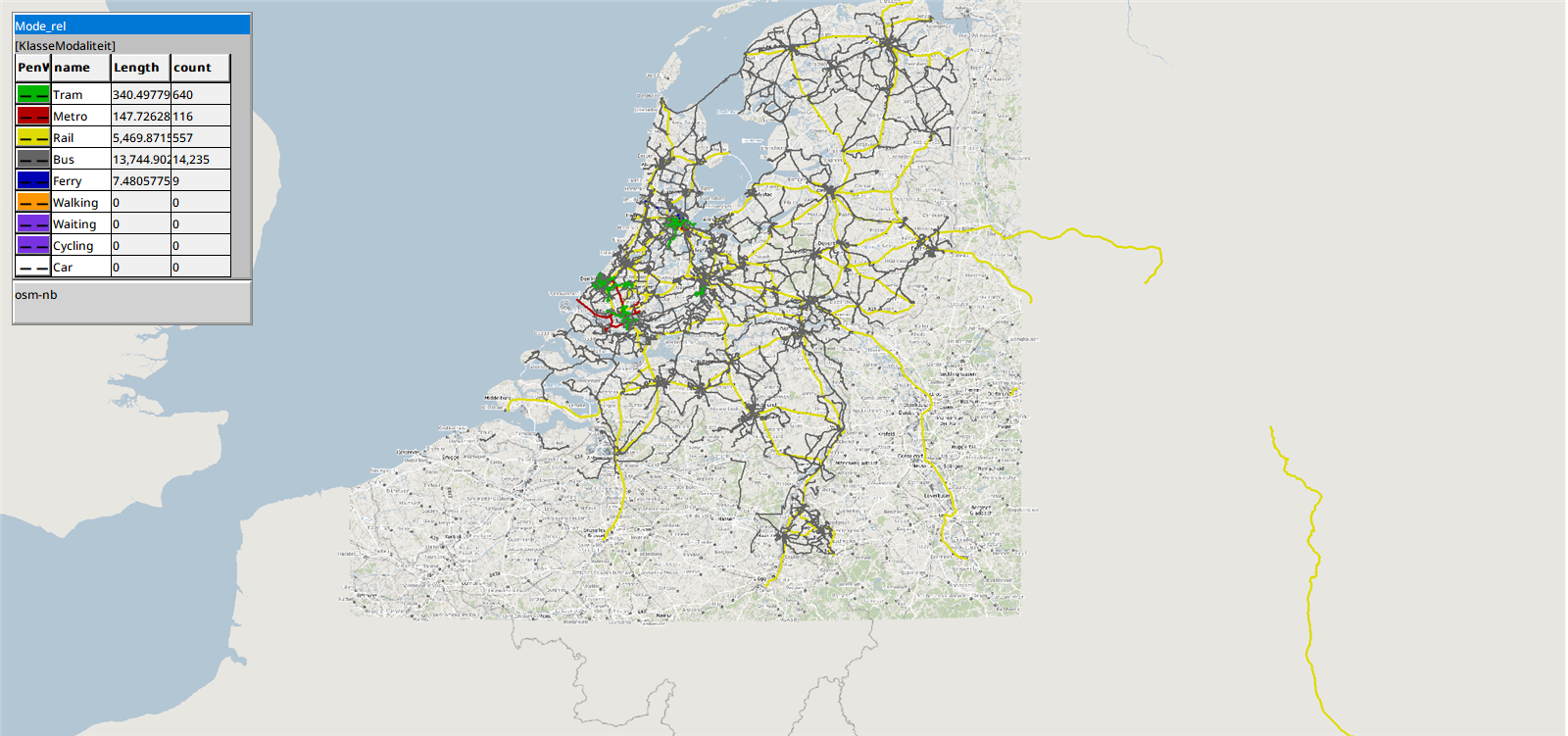
The same layer zoomed out: the network between 23:00 and 24:00, with the international trains to Germany and the bus network of De Lijn in Flanders.
Verification
For the window 07:00 to 09:00 on 13 October 2026 the export was compared with an independent count on the GTFS csv files (calendar_dates, trips, stop_times) for day D:
- 20,088 trips of D overlap the window; the export has 20,084 of them. The other 4 are the trips of line Z132 with only one stop.
- The export has 5 more trips of D−1: night trains from the day before that arrive in the morning. With their 14 links, the 289,652 links of D in the count make the 289,666 of the export.
- The 4,894 line variants match as well: 4,559 per shape in the count plus the 5 night trains, and 331 per stop pattern minus the single-stop trips of Z132.
A window from 23:00 to 01:00 on Saturday 17 October 2026 takes 31 trips of Sunday. A window on Sunday 25 October 2026 stops at the check on the change to winter time. All three formats were written and read back with GeoDMS. The export of a window of two hours takes about 30 seconds and 1.2 GB.