Routes of an OD pair
Since 21 October 2026 (#129) the model can be run for one origin-destination pair (HB-paar). It then keeps, for every option on the Pareto front, the route it takes, so that the options can be shown on a map, read as a table and plotted as price against travel time. This is done per component (walking WW, cycling CC, Car, the public transport components such as W_PT_W) and for the merged front (Samen).
Contents
- What it shows
- Settings
- Running it
- Viewing the results in GeoDmsGui
- Example: Laapersweg 1 Hilversum to De Boelelaan 1085 Amsterdam, 07:30
- How it works
- Limitations
What it shows
For each departure moment and each option of the front:
- Opties (options): one row per option, with component, departure moment, travel time, price and the modes used (
ModeUsed). These are the rows of the ordinary output of the pair, numbered per departure moment (Optie). - Onderdelen (parts): the journey description of each option, in the order of travel: the pre-transport leg, every public transport leg with its line and operator, the transfers between them and the post-transport leg; or the direct walk, bike ride or car trip. Each part has its stops or places, departure and arrival time, duration, distance and price.
- Links: every part as the links of its route, each with its geometry:
- walking and cycling legs, and the direct walk and bike ride: the links of the route over the (simplified) walking or cycling network;
- a public transport leg: the stop-to-stop links within the ride, between boarding and alighting;
- a transfer: the straight walking line between the two stops;
- the direct car trip: the TomTom road links of each route of the car front, with the shape of the road.
- Grafiek (chart): price against travel time per option.
Settings
All in cfg/main/ModelParameters.dms.
Group 1, as for any run:
AnalysisMomentandDagdeel: the analysis date and the part of the day (for example'Y2026','Ochtendspits').OrgsetandDestset: the sets the origin and destination come from, usually'Buurt2025'(or'Buurt2023'). The neighbourhood variant (CBS boundaries and BAG) is the one of these sets.
Group 6, EEN HB-PAAR:
| Parameter | Meaning |
|---|---|
OD_Herkomst | The origin: a name in Orgset, as OrgName in the output. For the neighbourhood sets the CBS neighbourhood code, for example 'BU04020501'. Empty: the whole model. |
OD_Bestemming | The destination: a name in Destset, as DestName, for example 'BU0363KP03'. Set both or neither. |
OD_Vertrekmoment | Optional: one departure moment of Dagdeel as hh:mm, for example '07:30'; empty means the four moments of the part of the day. It applies to every component, also those that otherwise compute one moment. |
OD_Optie | The option the map shows on its own (Kaart/Optie); 0 shows all. |
To find the neighbourhood of an address, look it up in the PDOK location server (https://api.pdok.nl/bzk/locatieserver/search/v3_1/free?q=<address>&fq=type:adres, field buurtcode) and check that the code exists in the neighbourhood map of the variant (cbsgebiedsindelingen2025.gpkg, layer buurt_gegeneraliseerd). The model uses the address-weighted centroid of the neighbourhood, not the address itself.
The components come from MergeComponents (the default is WW,W_PT_W,CC,C_PT_W,C_PT_OVf_C,Car), and the merged front uses MergeCriteria, as in How to run the model.
Engine. The routes of the car front need pareto with LinkSet in impedance_matrix (GeoDMS#1325, GeoDMS 20.25.1; until that release the build in C:\LocalData\GeoDMS_engine\20.25.0_06ee574b4). Advanced/EngineHasParetoLinkSet (default TRUE) says whether the engine has it; with an older engine set it to FALSE, and the car options have no route on the map. The chart opens with travel time on the horizontal axis on the same engine (DialogType = "XAxis").
Folders. With OD_Herkomst and OD_Bestemming set, intermediate results go to %LocalDataProjDir%\IntermediateResults_<O>_<D> and the output to %LocalDataProjDir%\Output_<O>_<D>, for example IntermediateResults_BU04020501_BU0363KP03. The folders of the whole model are not touched. The store names and signatures carry the pair as well (-bu04020501).
Running it
One script runs every component and the merge:
powershell -ExecutionPolicy Bypass -File batch\WriteODResults.ps1 -Org BU04020501 -Dest BU0363KP03 -Moment 07:30
Further parameters, with their defaults: -AnalysisMoment Y2026, -Dagdeel Ochtendspits, -Orgset Buurt2025, -Destset Buurt2025, -Label od (the OutputLabel), -Components (default MergeComponents), -Exe (the GeoDmsRun to use) and -WaitForMemoryGB (default 0).
The script makes a run copy of HEAD per component under C:\LocalData\NM_PBL_runs\od_<O>_<D>\<component>, with the settings above, and runs batch\UpdateAll.cmd in it:
legsandchainsonce, in the copy of the first public transport component;- per component
cars(forCar, the store of the departure moment) andoutput; outputin a copy withMergeOutputset.
Progress is written to C:\LocalData\NM_PBL_runs\od_<O>_<D>\status.txt. The chain step computes all public transport legs of the network in the time window, which takes 20 to 30 GB; with -WaitForMemoryGB every step waits until that much memory is available, so a pair does not make other runs page. Start it as a one-shot scheduled task, as described in Running UpdateAll as a scheduled task.
To run a single component by hand, set the parameters of group 1 and 6 and the component in ModelParameters.dms and run UpdateAll.cmd legs, chains, cars <moment> and output as usual.
The output step writes, next to the ordinary output PerBlock\tt_<moment>_1of1.parquet, PerBlock\od_<moment>.gpkg with three layers, opties, onderdelen and links. They can also be opened in QGIS.
Viewing the results in GeoDmsGui
Open cfg\main.dms with the same settings in ModelParameters.dms (groups 1 and 6). Everything is under /OD_Results. Type the path of an item in the address bar above the tree and press Enter; Ctrl+D then opens a Table View and Ctrl+M a Map View of it.
| Item | View |
|---|---|
/OD_Results/PerComponent/<component>/Opties | Table View: one row per option and departure moment. |
/OD_Results/PerComponent/<component>/Onderdelen | Table View: the journey description, per departure moment and option in the order of travel (Volgnr). |
/OD_Results/PerComponent/<component>/Links/geometry | Map View: the routes, each link in the colour and width of its mode. |
/OD_Results/PerComponent/<component>/Links/Modaliteit_rel | Map View: the same routes as a theme, with a legend per mode (length and number of links). |
/OD_Results/PerComponent/<component>/Kaart/Optie | Map View: only the option OD_Optie. |
/OD_Results/PerComponent/<component>/Grafiek/Prijs | Scatter Chart: price (euro) against travel time (min). |
/OD_Results/Samen/Opties, Samen/Links, Samen/Grafiek/Prijs | The same for the merged front. |
Colours. /OD_Results/Modes gives every mode a pen colour and width: train gold, metro red, tram green, bus grey, ferry dark blue, walking orange, cycling purple, car blue; train and metro 4 pixels wide, walking and cycling 2, the others 3. The links carry them as PenColor and PenWidth, so Links/geometry is drawn in these colours without a classification; Links/Modaliteit_rel uses the same colours as a theme with a legend.
Querying an element. Every link has its option (Optie), its part (Onderdeel, the Volgnr in Onderdelen), its place in the part (Volgnr) and its mode; open Links as a table to read them. The line, operator, stops and times of the part are in the row of Onderdelen with the same Optie and Volgnr.
The chart. Right-click Grafiek/Prijs in the tree and choose Scatter Chart. Travel time is on the horizontal axis (Grafiek/Reistijd has DialogType = "XAxis"). Turn the mouse wheel to zoom out if a point lies on the edge. On an older engine choose Use as X axis … Reistijd in the pop-up menu of the layer.
Example: Laapersweg 1 Hilversum to De Boelelaan 1085 Amsterdam, 07:30
Laapersweg 1, 1213VA Hilversum, lies in neighbourhood BU04020501 (Schilderskwartier); De Boelelaan 1085, 1081HV Amsterdam (Vrije Universiteit) in BU0363KP03 (VU-kwartier, district Zuidas). With Y2026 (Tuesday 13 October 2026), the morning peak and departure 07:30:
powershell -ExecutionPolicy Bypass -File batch\WriteODResults.ps1 -Org BU04020501 -Dest BU0363KP03 -Moment 07:30 -WaitForMemoryGB 40
On 21 October 2026 the legs of the pair took about 5 minutes and its chains less than 30 seconds; the output of the six components with -AlleenUitvoer (commit 37195bc) then took 7 minutes, of which 2 minutes each for WW and CC, 1 minute for the car store of 07:30 and 3 seconds for the merge. The options at 07:30:
| Component | Options | Travel time (min) | Price (euro) |
|---|---|---|---|
WW, CC | none: the walk and the bike ride are longer than the maximum travel time | ||
W_PT_W | 3 | 51.1 to 64.4 | 8.89 to 9.10 |
C_PT_W | 7 | 43.0 to 76.0 | 8.85 to 9.24 |
C_PT_OVf_C | 3 | 40.6 to 61.9 | 11.83 to 12.19 |
Car | 6 | 47.9 to 58.1 | 7.73 to 10.43 |
| Samen | 15: 6 car, 3 W_PT_W, 5 C_PT_W, 1 C_PT_OVf_C | 40.6 to 76.0 | 7.73 to 12.19 |
ModeUsed names the legs with one letter per mode: W walking, C cycling, B bus, T tram, M metro, R train, A car, and OVf the OV-fiets.
The map
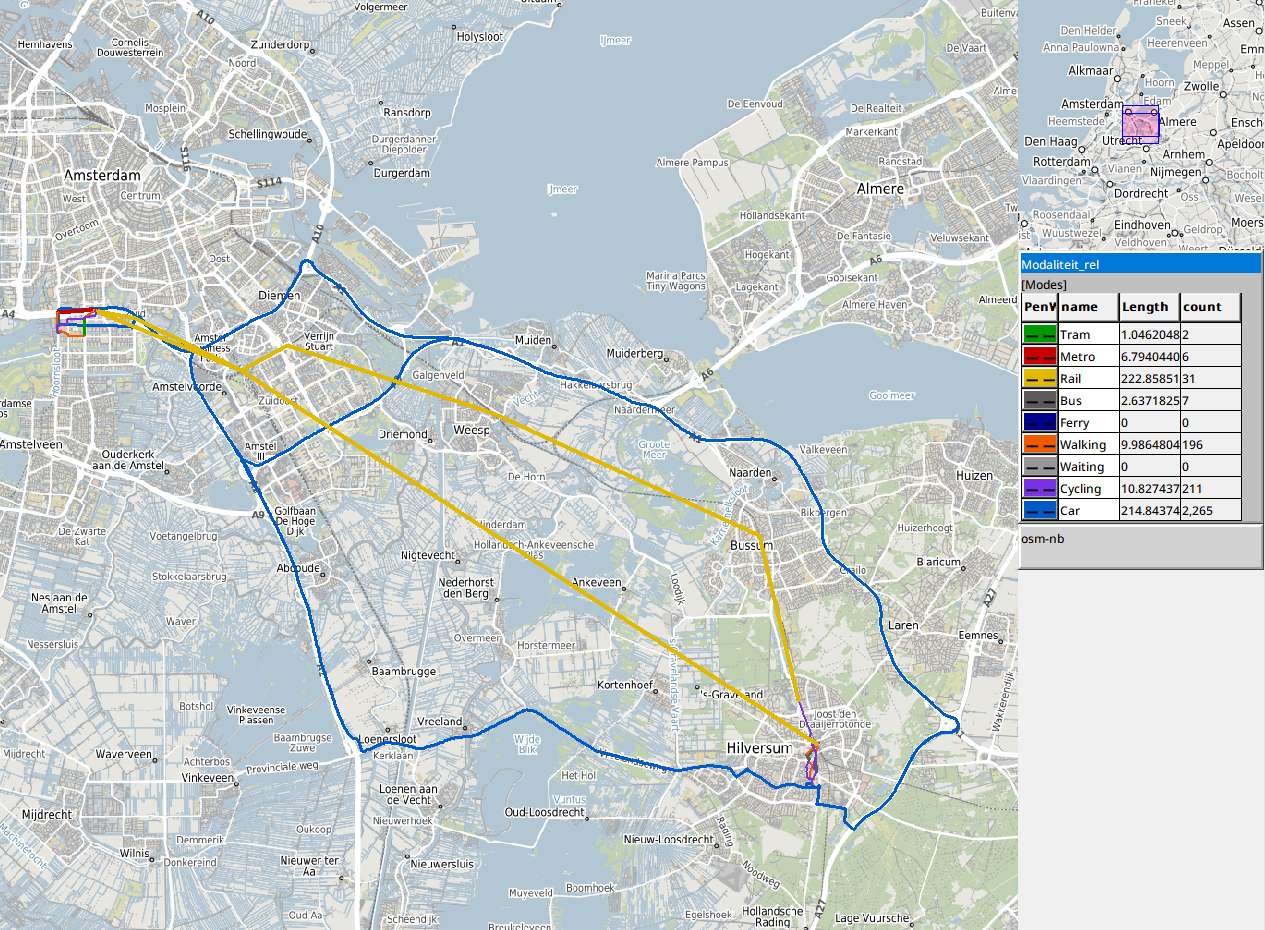
/OD_Results/Samen/Links/Modaliteit_rel in a Map View. The car has two corridors:
- options 1 to 4 take the N201 west and the A2 north, 32 km, 52 to 58 minutes, 7.73 to 7.80 euro: the shortest and cheapest;
- options 5 and 6 go east to the A1 and along the A1 to Amsterdam, 42 to 44 km, 48 to 49 minutes, 10.06 and 10.43 euro: the fastest.
Most train options take the train from Hilversum to Amsterdam Zuid, walking or by bus to the station, or cycling there. Some cyclists ride to Hilversum Media Park instead and take the Sprinter, changing at Weesp: the train line via Bussum on the map. A route via Utrecht Centraal is not on the front: it covers about twice the distance by rail (some 55 km against 29 km), so it takes longer and, with NS fares that grow with distance, costs more than the direct train, and is dominated on both.
A public transport link is the straight line between two stops of the ride, so a train leg is a few long straight lines (see Limitations).
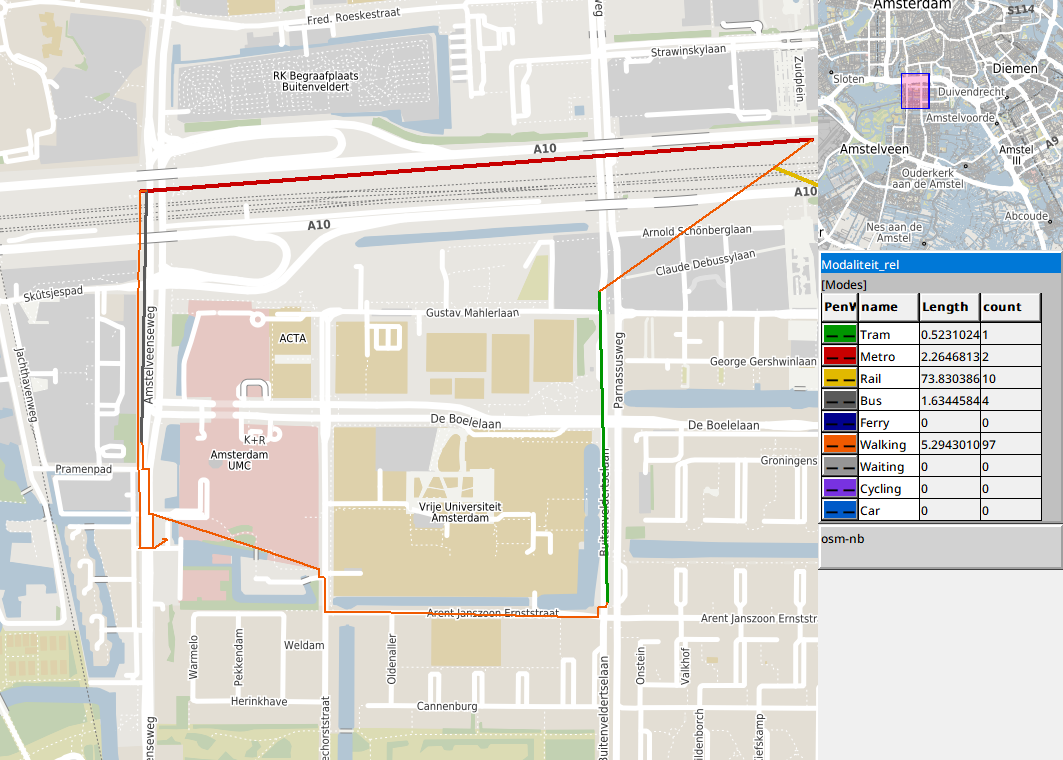
/OD_Results/PerComponent/W_PT_W/Links/Modaliteit_rel, zoomed in on the VU: from Amsterdam Zuid metro 50 (red) to Amstelveenseweg and bus 357 (grey, under the walk of option 3) to VU Medisch Centrum, or a walk to Parnassusweg and tram 6 (green) to A.J. Ernststraat, and the walks (orange) to the address-weighted centre of the neighbourhood.
The options
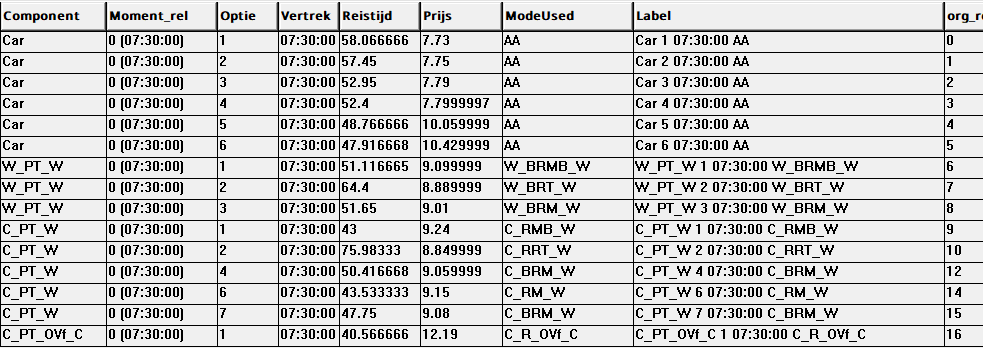
/OD_Results/Samen/Opties. Optie is the number of the option in the output of its component, so a row can be followed to PerComponent/<component>/Onderdelen and Links. The car options are on the merged front next to the public transport options because MergeCriteria also compares car and bike ownership: an option that needs a car does not dominate one that does not.
The journey description
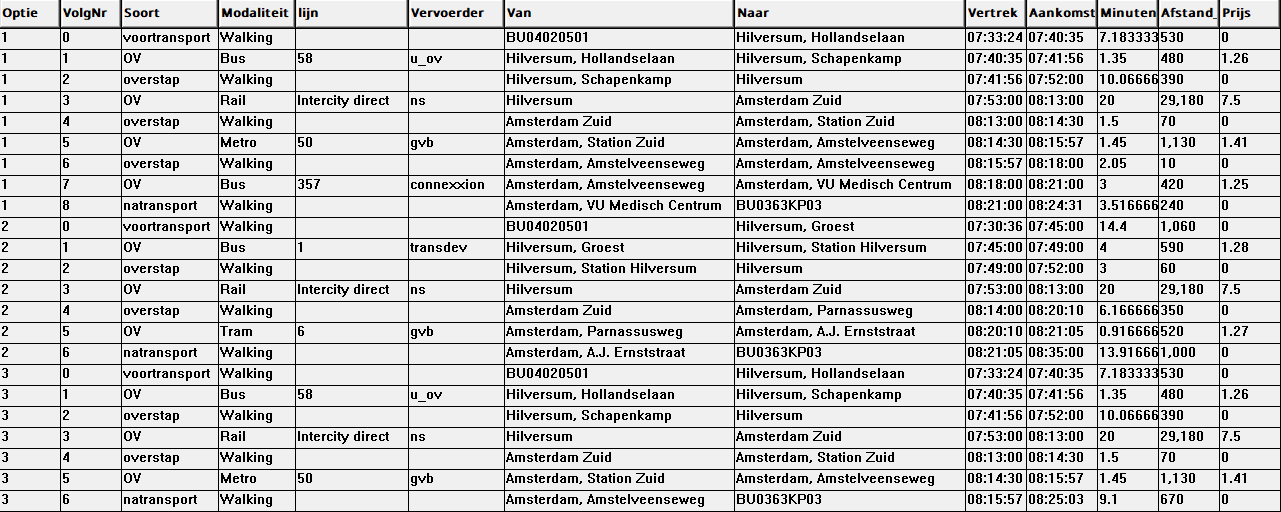
/OD_Results/PerComponent/W_PT_W/Onderdelen. Option 1 walks 7 minutes to the stop Hollandselaan, takes bus 58 to Schapenkamp and walks to Hilversum station, takes the 07:53 Intercity direct to Amsterdam Zuid (08:13), metro 50 to Amstelveenseweg and bus 357 to VU Medisch Centrum, and walks the last 240 m: 51.1 minutes from its start at 07:33. Option 3 walks from Amstelveenseweg instead of taking the bus (51.7 minutes, 9.01 euro). Option 2 walks 14 minutes to the stop Groest, takes bus 1 to the station and the same train, and tram 6 from Parnassusweg (64.4 minutes, but the cheapest, 8.89 euro).
The train is train 1820 of the Intercity direct series 1800, Amersfoort Centraal - Hilversum - Duivendrecht - Amsterdam Zuid - Schiphol - Rotterdam - Breda, as the feed of 25 September 2026 names it (route_short_name Intercity direct). It costs no supplement here: the supplement of the Intercity direct applies only to a leg that passes both Schiphol and Rotterdam (MakeODs, IsRitOpslagBeen).
Departure and arrival of a public transport part are those of the timetable: the departure of the first and the arrival of the last scheduled link of the leg (OD_Uitvoer, Rit_Vertrek and Rit_Aankomst, since 21 October 2026). The leg itself can begin or end a minute earlier or later. A stop where a vehicle stands still has two nodes, its arrival and its departure, joined by a dwell link within the ride, and both allow boarding and alighting by the stop time of the feed. In Hilversum the train arrives at 07:52 and leaves at 07:53, in Amsterdam Zuid it arrives at 08:13 and leaves at 08:14:
- a leg that cycles straight to the train boards at 07:53, the departure, because leaving home a minute later gives the shorter travel time;
- after a bus and a walk the transfer ends in time for either node, and the chain keeps one of two equal chains, here the one boarding at 07:52: the transfer before the train ends at 07:52, a minute before the train leaves;
- an option that changes to metro 50 at 08:14:30 alights at 08:13, the arrival, to make the transfer of 1.5 minutes; one that waits for tram 6 at 08:20 can alight at either and here alights at 08:14, so its transfer starts a minute after the train arrives.
The travel time and the price of the option do not depend on it.
The chart
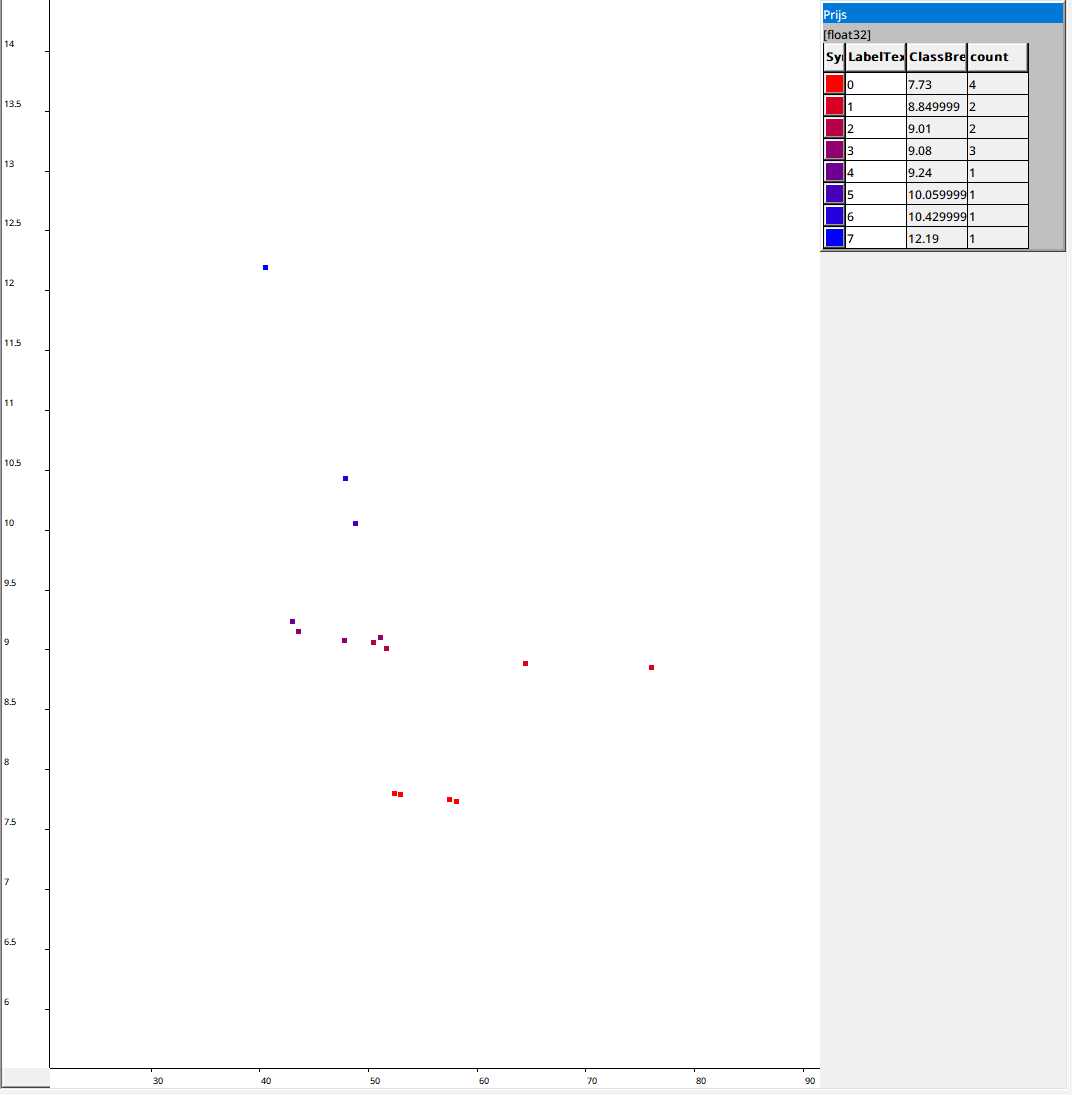
The Scatter Chart of /OD_Results/Samen/Grafiek/Prijs, zoomed out one step with the mouse wheel: travel time on the horizontal axis, price on the vertical axis. At the bottom the four short car routes (about 7.75 euro), at 48 minutes and 10 to 10.50 euro the two A1 routes, around 9 euro the public transport options, most of them between 43 and 52 minutes, and at the top left the fastest option, by bike and train with an OV-fiets at the end (40.6 minutes, 12.19 euro).
How it works
One origin, one destination. PublicTransport_Prep/impl/org and dest_src are the one element of Orgset and Destset with that name (OD_Org, OD_Dest), so everything after them, the places, the origin block, the legs, the direct trips and the car, has one origin and one destination.
Pre- and post-transport. The leg stores ask the walking and cycling searches for their LinkSet as well, and write the links of every leg as <store>_links.gpkg next to the parquet store (LegStores/<type>/Write_LegLinks). The links come in the order of travel from Templates/RouteLinks_T, which turns the LinkSet of an impedance_matrix (from the end of the route to its start) into links with their start and end node, also on a two-way network.
Public transport, short on both sides. The chain step computes one stop block: the stops the origin reaches with the pre-transport types of the public transport components in MergeComponents (OD_Haltes/IsVStop). The last leg of the longest chains only goes to a stop from which the destination can be reached (OD_x/Result_ToD), and only chains to such stops are kept. For these stops these are the same chains as in the store of the whole model. OD_Ketens traces every chain back to its legs and transfers through the chain joiner (Right_rel, Valid1_rel->Transfers_rel, Left_rel) and writes them as benen.mmd next to the block store, in the same request. In the output step a search with LinkSet between the start and end node of a leg in the time-expanded network (Set_L or Set_R) gives the links within the ride: between two nodes every path takes the same time, and the search picks the shortest, as the Pareto legs do.
Car. In OD mode the time-dependent car search asks for the LinkSet of every route of the front (pareto with LinkSet, GeoDMS#1325), and the car store writes the links with the shape of the TomTom road next to the store (Write_CarLinks).
Output. PerDepartureMoment_T keeps, only when asked in OD mode, where each row comes from (PT_InBlock_rel, VPT_rel, VPTN_rel, Bron_rel, Union_rel, First_rel). OD_Uitvoer follows them from each option back to its pre-transport leg, chain and post-transport leg, or to its direct trip, and writes the three layers. In the whole model none of this is computed.
Limitations
- A public transport link is the straight line between two stops; the shape of the ride (
shapes.txt) is not yet cut per stop pair. - Walking and cycling links follow the simplified network, a straight line per link.
- The price of a public transport part is that of the leg on its own; in the chain a through fare or the maximum of the boarding fares can apply, so the parts need not add up to the price of the option.
- The merged front in
/OD_Results/Samenis computed from the options of the components withMergeCriteria, likeComponentMerge; the merged output inOutput_<O>_<D>\<date>_<label>_Merged1can be used to check it.